Start with the honest filter. BuildOps is a commercial platform with project management, fire and life safety inspections and construction accounting integrations.12 TradesWork has none of those. If they're part of how you work, moving to TradesWork would be a step backwards, and you should compare commercial platforms instead.
This guide is for the other case: a residential-first HVAC, plumbing or electrical shop that bought BuildOps for a commercial push, uses a fraction of it, and wants homeowner tools, published pricing and free office seats. For that shop, here's the plan, with the import shown on real TradesWork screens. BuildOps facts come from its own site and terms, checked October 15, 2026.
Is TradesWork the right destination?
| If you use this in BuildOps, TradesWork today is… | |
|---|---|
| Submittals, RFIs, change orders, job costing | Not built. Stay on a commercial platform. |
| NFPA inspections and deficiency tracking | Not built. Stay on a commercial platform. |
| Vista, Spectrum, Sage Intacct or NetSuite | Not supported. QuickBooks Online only. |
| Maintenance agreements across multiple sites | Multi-site service agreements with PM visits and SLA hours |
| POs, not-to-exceed, net terms | Built, enforced on the invoice |
| Residential customers and memberships | Built: memberships, member pricing, good/better/best |
Source: BuildOps home and pricing pages; TradesWork multi-location and commercial feature
If the first three rows describe your week, close this page and look at commercial options. Our TradesWork vs BuildOps and TradesWork vs ServiceTrade pages say so directly.
The whole move on one page
Week -4
Fit check and export request
Confirm TradesWork fits. Read your Order for the term end. Send BuildOps the written export request.
Week -2
Files in hand
Exports opened and checked. Inspection, project and agreement records archived. Phone ports requested.
Week -1
Sandbox import
Customers and price list into a sandbox company. Every commercial site checked. Leftover rows fixed.
Weeks 1–2
Rebuild and residential pilot
Import into your real company. Commercial terms, service agreements and memberships set up. One residential crew live.
Weeks 3–4
Office and payments
Office on TradesWork. Payment re-collection starts. Accounting cut-over date set.
Weeks 5–8
Commercial accounts move
Agreements tested on real visits, then commercial accounts move.
Within 30 days after term end
Written notice, if needed
Only if you still need BuildOps to produce data under §5(d).
What moves, what stays, what you rebuild
- Customers and properties (requested)PartlyCustomers and service locationsEach row's address becomes a service location. How a customer with many properties groups depends on your file; check every site in the sandbox.
- Price book or rate sheet (requested)ImportsPrice bookName and price required. Code, description, category and cost carry over if present.
- Assets by propertyKeep as archiveEquipment you re-enterAgreement sites first.
- Maintenance agreementsKeep as archiveService agreements you set upSites, covered equipment, PM plan, SLA hours, billing cadence.
- Jobs, quotes, invoicesKeep as archiveYour archiveThe spreadsheet importer takes customers and price lists only.
- Projects and inspection recordsKeep as archiveYour archiveCan't be imported or produced in TradesWork.
- Saved payment methodsKeep as archiveRe-collectedPayment data stays with the processor.
BuildOps doesn't publish export instructions, so ask your BuildOps contact in writing which records you can export, from where, and in what format. Our BuildOps export guide has the full request list and a request you can copy. Then mind the clock: BuildOps' terms say it will make Customer Data available for export if it receives written notice within 30 days after expiration or termination, and that after those 30 days it has no obligation to keep the data (§5(d)).3 Your subscription term is in your Order (§10(a)).3 Get everything before the term ends.
Bring it into TradesWork
Start a 14-day TradesWork trial with no card. Open Settings, Integrations and go to the import page; you need the Owner or Admin role.
1. Choose Another system or a spreadsheet
The source buttons sit across the top of the import page; press Another system or a spreadsheet. Drop CSV, Excel or a ZIP, up to 50 MB per drop. TradesWork never logs in to BuildOps.
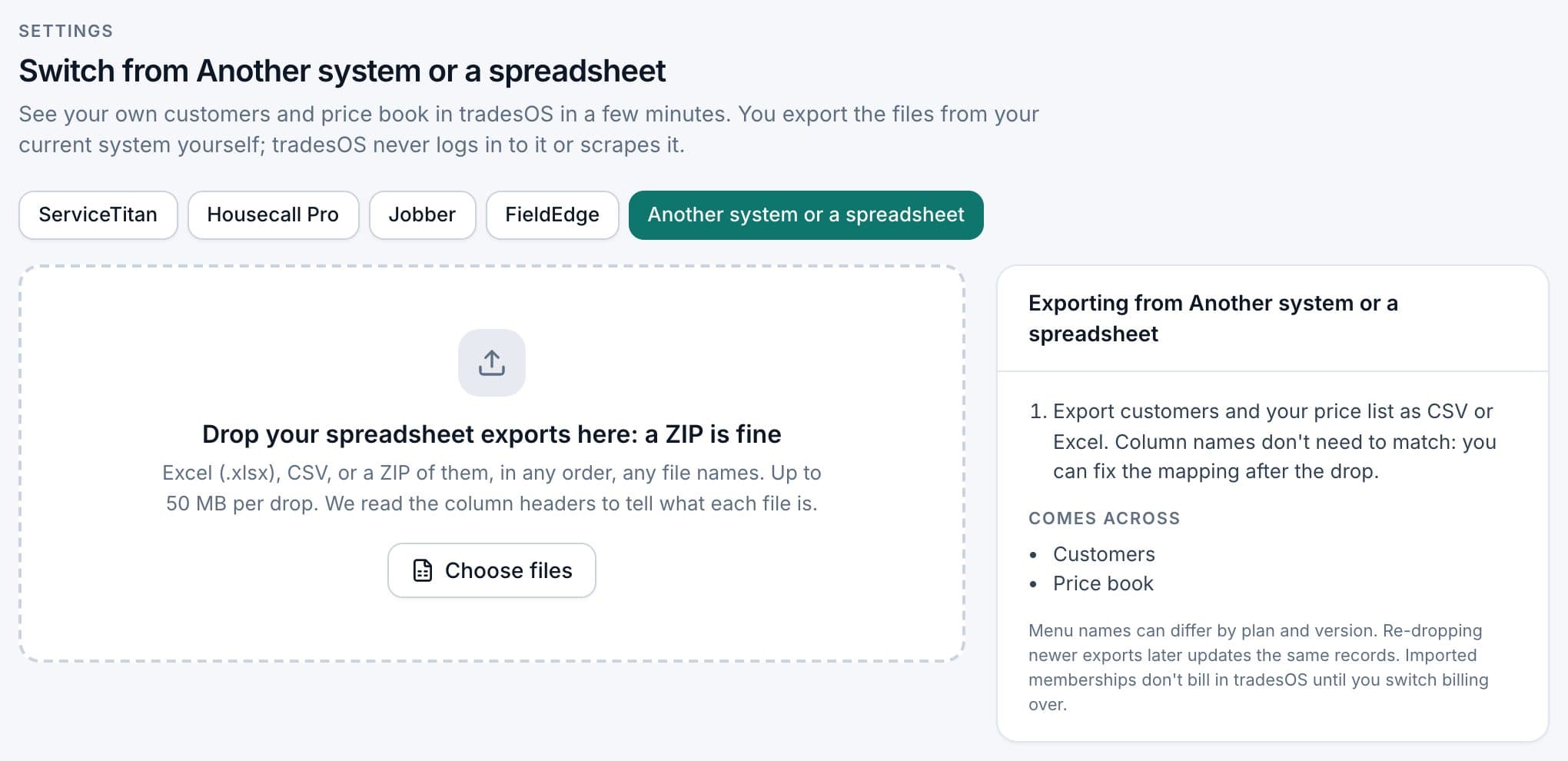
For commercial customers with many sites, check that each site came through with the right address, and add any that didn't by hand before you build agreements on them. Keep the BuildOps customer and site IDs as a column in your spreadsheet. When someone asks about a job from two years ago, that ID is how you find it in your archive.
What you set up by hand
- Commercial terms. On each commercial customer, turn on PO required, set a not-to-exceed limit and net terms, and add billing and site contacts. Blocking invoices without a PO is a setting that's off by default; turn it on if your customers require POs.
- Service agreements. Pick the sites and covered equipment, the PM visit plan, SLA response hours and billing cadence. Visits become jobs ahead of time and billing consolidates to one invoice per customer per month. SLA tracking is a countdown on the job; it won't escalate on its own.
- Residential memberships. For homeowners, set up membership plans with member pricing.
- Assets. Add equipment for agreement sites first.
The side-by-side run, and re-importing newer exports
Move residential work first, where TradesWork is strongest. Put one crew on it for two to four weeks while BuildOps runs everything else. Move commercial accounts once their agreements and terms are set and tested on a few real visits.
If the office adds customers or sites in BuildOps during the run, export again and drop the file. Customers are matched by the Customer ID column you mapped, or by name and address, so a re-drop updates rather than duplicates, and it never deletes anything.
Accounting, payments and phones
Accounting. TradesWork syncs with QuickBooks Online. BuildOps lists Vista, Spectrum, Sage Intacct, NetSuite and QuickBooks.2
- Already on QuickBooks Online: pick a cut-over date. Invoices before it stay as they are and are collected where they were billed. Invoices after it come from TradesWork; imported customers never post. Turn off BuildOps' sync on that date and watch for duplicate customers.
- On another accounting system: moving to QuickBooks Online is its own project. Talk to your controller first; for many commercial shops this alone rules TradesWork out.
Payments. BuildOps lists a Payments+ add-on.2 Card and bank details stay with the processor. Send homeowners a secure link to save a card in TradesWork, and ask commercial customers who pay electronically to set up payment again.
Phones. Port business numbers from Settings, Phones, Numbers, Routing and Texting, Bring your numbers. Ports take one to two weeks; keep old service active until each port shows done.
What switching costs
| Cost | Example | Your number |
|---|---|---|
| TradesWork subscription | 10 × $99 = $990 a month; office staff free | |
| BuildOps overlap | Per your Order; BuildOps doesn't publish pricing | |
| Office rebuild time | 30–60 hours (example): commercial terms, agreements, assets | |
| Tech training | 2–3 hours per tech (example), residential crew first | |
| Accounting move | Only if not on QuickBooks Online | |
| Lost workflows | Projects, inspections: must not be needed |
BuildOps to TradesWork checklist
- Fit check passed: no projects, inspections or construction accounting needed
- Term end from your Order in the calendar
- Written export request answered and files opened
- Inspection, project and agreement records archived
- Sandbox import checked, every commercial site confirmed
- Customers and price list imported into your real company
- Commercial terms and service agreements set up and tested
- Residential pilot complete
- Accounting cut-over date set, BuildOps sync off
- Payment re-collection and phone ports under way
- Final exports stored twice
The bottom line
For a commercial-first contractor, BuildOps is the better tool and this migration isn't worth it. For a residential-first shop carrying more platform than it uses, TradesWork can be a simpler, published-price fit, as long as you're on QuickBooks Online and your commercial accounts need terms and agreements, not inspections and projects. Use the buyer's guide to check.
Footnotes
-
BuildOps, home page. https://buildops.com/ ↩
-
BuildOps, Pricing. https://buildops.com/pricing/ ↩ ↩2 ↩3
-
BuildOps, Terms of Service, last updated May 28, 2026, §5(d), §10(a). https://buildops.com/terms-of-service ↩ ↩2
