Most software switches move your customers and your schedule. Leaving Successware moves your books as well, because Successware has accounting built in and TradesWork doesn't. That makes this a two-to-three-month project led as much by your accountant as by your office manager. If you're not ready to run your general ledger in QuickBooks Online, stop here and stay on Successware.
If you are, here's the plan, including the parts that are slow. The import screens below are real TradesWork screens. Successware facts come from its own site, checked October 15, 2026, plus one competitor's help article, which we flag.
The whole move on one page
Week -8
Plan and request
Accountant engaged, cut-over date picked at a month or quarter end, written export request sent to Successware.
Weeks -6 to -3
Files and books
Exports received and opened. Gaps followed up in writing. QuickBooks Online chart of accounts built.
Week -2
Sandbox import
Customers and price book into a sandbox company. Leftover rows fixed. Phone ports requested.
Week -1
Real import and rebuild
Import into your real company. Memberships, equipment for members, forms and team set up.
Weeks 1–3
Pilot crew
One crew on TradesWork, everything else in Successware. Card links go out to members.
Week 4 (cut-over)
Everyone moves
Opening balances in QuickBooks Online. TradesWork connected. All new jobs and invoices in TradesWork.
After cut-over
Wind down
Old A/R collected as planned. Final exports stored. Successware ended per your agreement.
What moves, what stays, what you rebuild
- Customers and locations (CSV or Excel)ImportsCustomers and service locationsName, phone, email and address matched in the column review. The address becomes the first service location.
- Price book (CSV or Excel)ImportsPrice bookName and price required. Code, description, category and cost carry over. Sale and expense types don't; your accountant maps them in QuickBooks.
- Database backup (.BAK, .MDB)Keep as archiveYour archiveCan't be dropped into TradesWork.
- AgreementsKeep as archiveMemberships you set upEnroll each active member with the next visit due.
- Equipment by locationKeep as archiveEquipment you re-enterMembers first.
- Jobs and invoicesKeep as archiveYour archiveThe spreadsheet importer takes customers and price lists only.
- General ledger, A/R, A/PKeep as archiveOpening balances in QuickBooks OnlineEntered by your accountant as of cut-over.
- Saved cardsKeep as archiveRe-collected by secure linkCard data stays with Successware Payments' processor.
The export side is covered in how to export data from Successware, including a request you can copy. A competitor's help center describes the files hosted Successware shops typically get from Successware support: a database backup and an A/R Aging report in Excel.1 A backup isn't something you can import into TradesWork, so ask for spreadsheets. Successware's site directs existing customers to their Account Executive or 888-272-8009 with platform questions.2 Allow time; this step usually sets the pace of the whole project.
Plan the accounting move first
Successware describes accounting with A/R, A/P, invoices, income statements and balance sheets, where price book items carry sale and expense types that decide how they post to the general ledger.3 Sit down with your accountant and decide:
- Cut-over date. A month end or, better, a quarter end.
- Chart of accounts in QuickBooks Online, mapped from your Successware sale and expense types.
- Opening balances as of cut-over: bank, A/R, A/P, inventory, payroll liabilities.
- Open A/R. Either collect pre-cut-over invoices in Successware until they're paid, or enter them in QuickBooks as opening invoices. Pick one, not both.
- Payroll. Successware lists ADP and QuickBooks Payroll integrations;3 both work with QuickBooks Online.
Bring it into TradesWork
Start a 14-day TradesWork trial with no card. Open Settings, Integrations and go to the import page; you need the Owner or Admin role.
1. Choose Another system or a spreadsheet
The source buttons sit across the top of the import page; press Another system or a spreadsheet. Drop CSV, Excel or a ZIP of them, up to 50 MB per drop. A database backup won't be read.
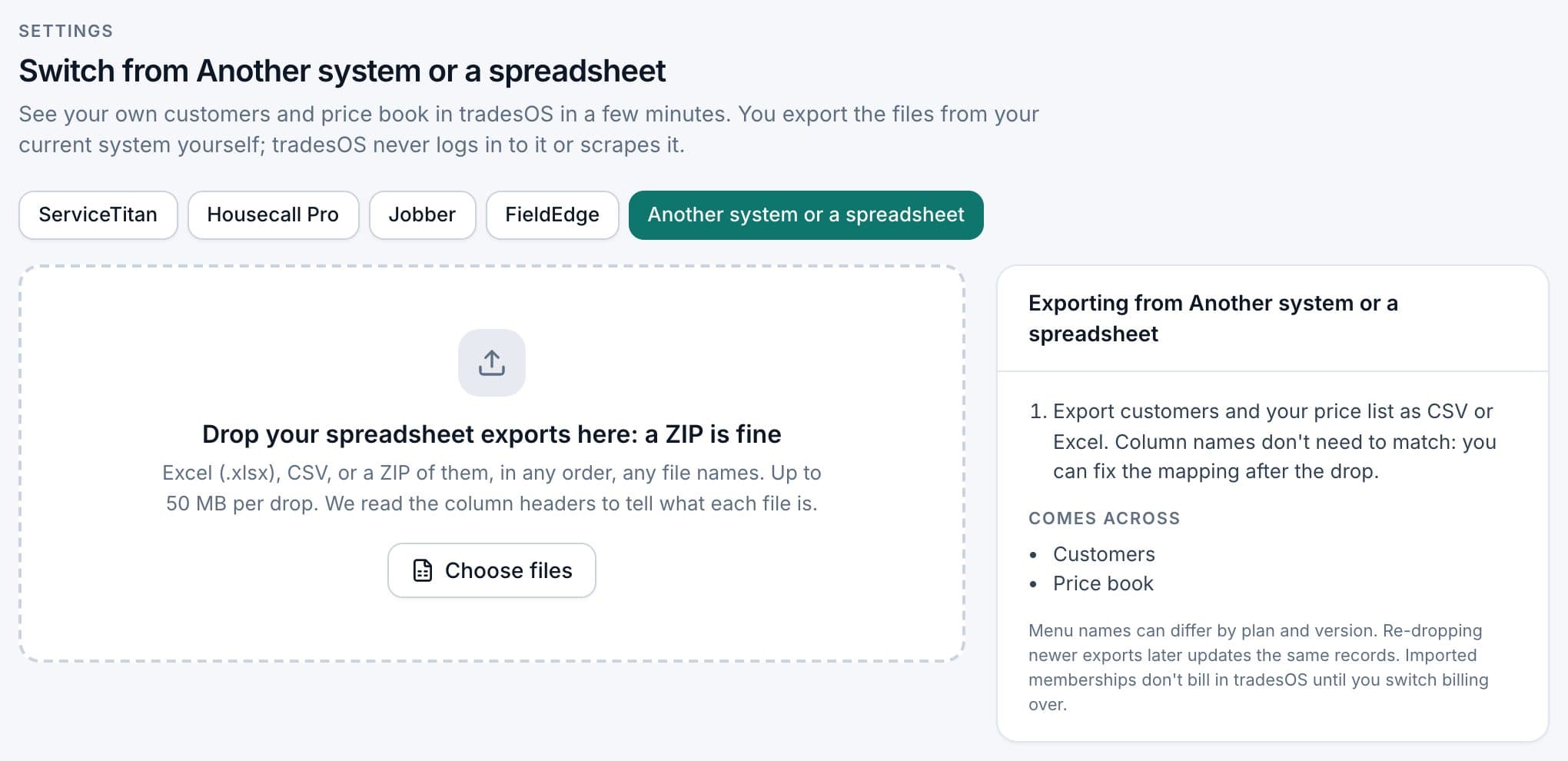
Tips for Successware files:
- Customers and locations in one file or two? The spreadsheet importer reads a customer list where each row's address becomes a service location. If Successware sends separate customer and location files, ask for one combined file, or check in the sandbox how billing accounts with several addresses came across.
- Keep Successware IDs as a column, even if you don't need them in TradesWork. They're how you'll find an old job in your archive.
- Spot-check twenty customers. Fix problems in the spreadsheet and drop it again.
What you set up by hand
- Memberships. Create plan types that match your Successware agreements. Enroll each active member with the next visit due. Set the first TradesWork billing date after the member's last Successware charge so nobody pays twice.
- Equipment. Add units for members first. Techs can photograph the data plate on the next visit.
- Forms and checklists. Rebuild the maintenance and inspection forms your techs use.
- Team. Office staff, helpers and apprentices are free seats in TradesWork.
The side-by-side run, and re-importing newer exports
During the pilot, book that crew's new work in TradesWork and keep everything else in Successware. Because your books are still in Successware until cut-over, keep the pilot small, and have your accountant decide how the pilot crew's invoices are recorded.
If you can get a fresh customer export from Successware near cut-over, drop it again. Customers are matched by the Customer ID column you mapped, or by name and address, so a re-drop updates rather than duplicates, and it never deletes anything. If getting a second export takes weeks, add new customers by hand during the pilot instead.
Payments, phones and QuickBooks
Cards. Successware Payments is in-house, integrated processing.4 Card data stays with the processor. Send members and customers with saved cards a secure link to save one in TradesWork, starting with members whose dues come up first.
Phones. Port business numbers from Settings, Phones, Numbers, Routing and Texting, Bring your numbers. Ports take one to two weeks; keep the old service active until each port shows done.
QuickBooks Online. Connect TradesWork once your accountant has entered opening balances, and set the connection's cut-over date to match. Only invoices and payments created in TradesWork after it post.
What your team will notice
CSRs get a caller pop-up showing history, open jobs, balance and membership before they answer, plus an AI receptionist for overflow and after hours. Techs get an app that keeps saving estimates, photos and forms with no signal, in English or Spanish. Your bookkeeper stops working inside the field software and works in QuickBooks Online instead. That change is the one to plan training around.
What it really costs
| Cost | Example | Your number |
|---|---|---|
| TradesWork subscription | 8 × $99 = $792 a month; office staff free | |
| QuickBooks Online | Intuit's published price for your plan; needed because TradesWork has no ledger | |
| Accountant setup | Several hours to a few days (example) | |
| Successware overlap | Per your agreement; we found no published pricing or terms | |
| Export fees, if any | Ask in writing | |
| Office setup time | 30–50 hours (example) | |
| Tech training | 2–3 hours per tech (example) |
Successware to TradesWork checklist
- Accountant signed off on the QuickBooks Online plan and cut-over date
- Written export request answered, files opened and checked
- Spreadsheets received, not only a database backup
- Sandbox import checked and leftover rows fixed
- Customers and price book imported into your real company
- Every active agreement set up as a membership
- Pilot crew ran two normal weeks
- Opening balances entered as of cut-over
- Card re-collection and phone ports under way
- Old A/R plan written down
- Final exports and accounting reports stored twice
When to stay on Successware
If your office runs its whole back office in Successware, your accountant doesn't want to move the books, or your team is trained and productive on it, the cost and disruption likely outweigh what TradesWork adds today. Weigh both on TradesWork vs Successware and the buyer's guide.
Footnotes
-
ServiceTitan help center (a competitor), Export your Successware data. https://help.servicetitan.com/residential-s-r/docs/export-your-successware-data ↩
-
Successware, The New Successware Platform. https://www.successware.com/successware-new-platform/ ↩
-
Successware, Integrated accounting. https://www.successware.com/features/integrated-accounting/ ↩ ↩2
-
Successware, HVAC software. https://www.successware.com/industries/hvac-software/ ↩
