Moving from FieldPulse to TradesWork is a spreadsheet migration, not a push-button one. Your customers and your price list come across. Your job and invoice history stays in your FieldPulse exports as an archive. Memberships, equipment and forms you set up again. Plan on an afternoon for the import and a few weeks for everything around it, timed to your FieldPulse contract.
This guide is written by TradesWork, so read it with that in mind. FieldPulse facts come from its help center and terms, checked October 15, 2026. The import screens below are real TradesWork screens.
The whole move on one page
Before week -2
Notice deadline
Find your FieldPulse term end. Written notice to cancellations@fieldpulse.com is due 60 days before it on an annual plan.
Week -2
Export and start
Run every FieldPulse export, request the item list in writing, start a TradesWork trial and request your phone port.
Week -1
Sandbox import
Import customers and items into a sandbox company. Fix leftover rows. Set up memberships, forms and your team.
Week 1
One crew live
Import into your real company. One crew books, works and invoices in TradesWork. Connect QuickBooks with a cut-over date.
Week 2
Office and cards
The office books new work in TradesWork. Send card links to customers on recurring billing.
Week 3
Everyone
Remaining crews move. Re-drop a fresh customer export to pick up changes.
Week 4
Wind down
Port shows done. FieldPulse is read-only for old balances. Final exports stored twice.
What moves, what stays, what you rebuild
- Customers export (.csv)ImportsCustomers and service locationsName, phone, email and address matched in the column review. The address becomes the first service location. A second phone goes into notes.
- Item list and pricebook (from support)ImportsPrice bookName and price required. Code, description, category, cost and item type (service, material, equipment) carry over.
- Jobs Raw Data CSVKeep as archiveYour archiveThe spreadsheet importer takes customers and price lists only.
- Estimates and invoices exportsKeep as archiveYour archiveOpen balances are collected where they were billed.
- Maintenance agreementsKeep as archiveMemberships you set upNo documented FieldPulse export. Enroll members by hand.
- Equipment, forms, ClearPath workflowsKeep as archiveRebuilt in TradesWorkEquipment for members first; forms and checklists your techs use.
- Saved cardsKeep as archiveRe-collected by secure linkCard data stays with FieldPulse's processor.
Our FieldPulse export guide shows every click path. In short, as an Admin:
- Customers: Customers, Export. A CSV arrives by email.1
- Estimates and invoices: each list, Export. Summary columns arrive by email.2
- Jobs: Reporting under Management, Jobs, Raw Data, Load Data, Export CSV. Run a year at a time.3
- Items and pricebook: we found no public help article for a standalone export. Ask support in writing.
Bring it into TradesWork
Open Settings, Integrations and go to the import page. You need the Owner or Admin role. Here's the whole flow on real screens.
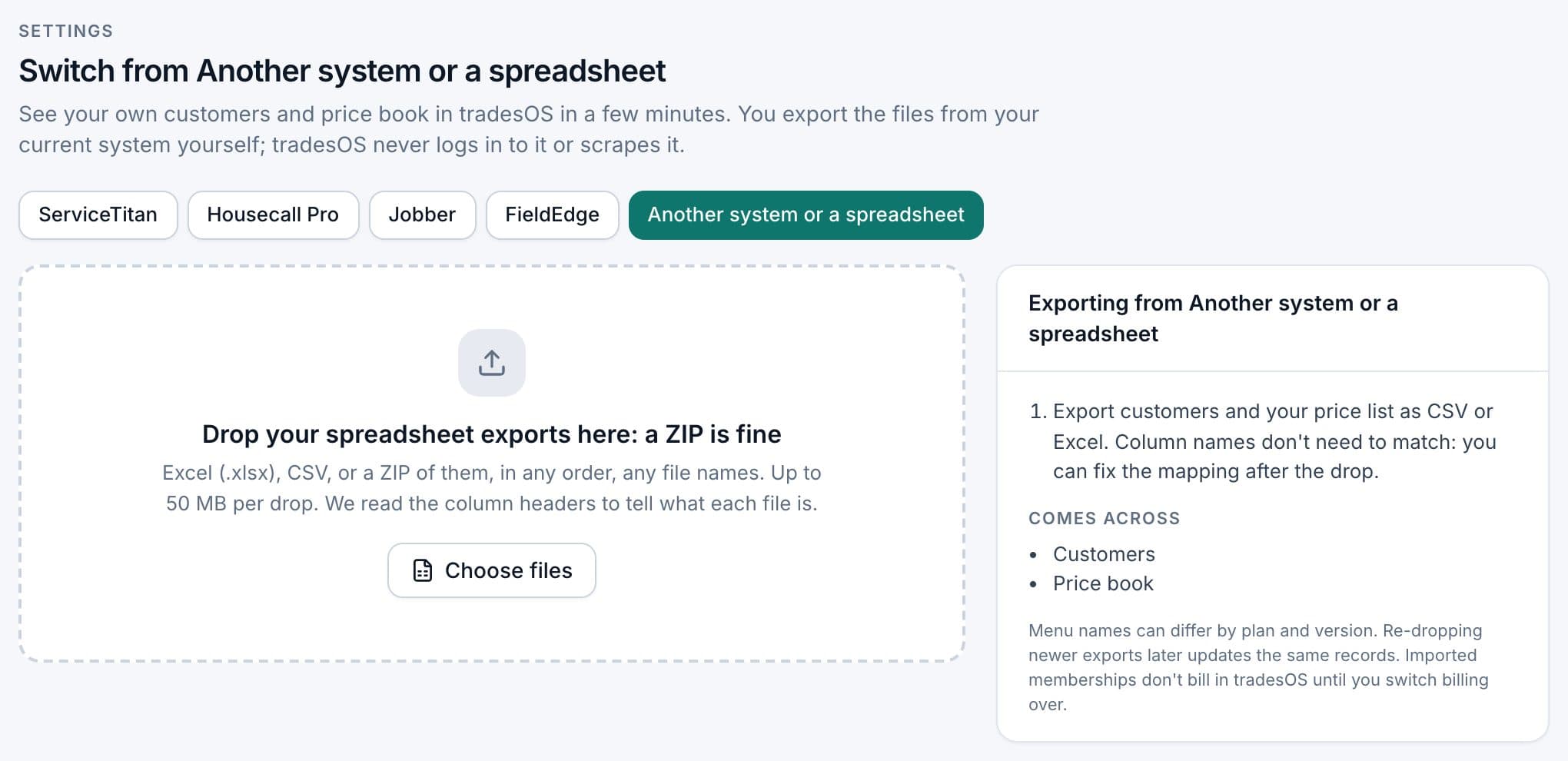
1. Choose Another system or a spreadsheet
The source buttons sit across the top of the import page; press Another system or a spreadsheet. Drop CSV, Excel or a ZIP, up to 50 MB per drop. TradesWork never logs in to FieldPulse.
A few things that make the FieldPulse files go in cleanly:
- Names. One full-name column or separate first and last name columns both work. A row with a company name and no person name comes in as a commercial customer.
- Prices. "$1,249.00" is fine. Text like "call for price" isn't an amount and lands on the leftovers list.
- Custom fields. Columns with no TradesWork field stay behind in your file. If one matters, map it to Notes.
- Spot-check twenty customers you know well. Fix problems in the spreadsheet and drop it again rather than editing hundreds of records by hand.
What you set up by hand
This is where the real hours go, so list it honestly:
- Memberships. Set up your plan types, then enroll customers with active FieldPulse maintenance agreements. Set each member's first TradesWork billing date after their last FieldPulse charge, so nobody is charged twice.
- Equipment. Add units for your members and recent installs first. Techs fill in the rest on the next visit.
- Forms and checklists. Rebuild the inspection and maintenance forms your techs actually use.
- Automations and templates. Estimate and invoice wording, reminders, follow-ups.
- Team and settings. Office staff, helpers and apprentices are free seats in TradesWork, so add everyone.
The side-by-side run, and re-importing newer exports
Don't flip the whole company on a Monday. Put one crew on TradesWork for two to four weeks while FieldPulse stays live for everyone else. When that crew's week looks normal, move the office, then the remaining crews.
During the run, the office keeps adding customers in FieldPulse. Re-export the customer list and drop it into TradesWork again. Customers are matched by a Customer ID column if your file has one, or by name and address, so a re-drop updates what's there instead of duplicating it. Re-drops add and update; they never delete. If a customer's name or address changed between exports, check for a duplicate afterwards.
Payments, phones and QuickBooks
Cards. Card data sits with the payment processor, not in your export. Pull a list of customers on recurring billing, then send each a secure link to save a card in TradesWork, starting with members whose dues come up first. Expect to chase a few by phone.
Phones. If your business numbers live with FieldPulse's communications or another carrier, they move by porting. In TradesWork go to Settings, Phones, Numbers, Routing and Texting and choose Bring your numbers. Ports take one to two weeks; keep the old service active until the port shows done.
QuickBooks Online. Pick a cut-over date. Invoices before it stay in FieldPulse and QuickBooks as they are; collect those balances where they were billed. Invoices after it come from TradesWork. Imported customers don't post anything to accounting. Turn off FieldPulse's QuickBooks sync on the cut-over date and check for duplicate customers. If you use QuickBooks Desktop, TradesWork isn't a fit today.
Give notice on time
FieldPulse's help center says customers who signed up after November 2023 are on an annual contract, and that cancelling can't end it mid-term.4 Its terms say annual subscriptions renew for one-year terms unless you give written notice at least 60 days before the term ends, and month-to-month subscriptions need 30 days (§8.5, §8.6).5 Notices go to cancellations@fieldpulse.com. FieldPulse's terms also give you 60 days after the subscription ends to export your data (§24.8).5 Treat that as a backup.
What switching really costs
| Cost | Example | Your number |
|---|---|---|
| TradesWork subscription | 6 × $99 = $594 a month; office staff free | |
| FieldPulse overlap | Your current monthly cost × months left; FieldPulse doesn't publish prices6 | |
| Office time for the rebuild | 20–40 hours (example) | |
| Tech training | 2–3 hours per tech (example) | |
| Card re-collection | A few calls for stragglers | |
| Phone porting | Carrier fees, if any |
The biggest cost is usually the overlap. If your FieldPulse term has nine months left, switching now means paying for both. Many shops start the rebuild early and time the cut-over to the term end.
FieldPulse to TradesWork checklist
- Renewal date and 60-day notice deadline confirmed
- Customers, estimates, invoices and Raw Data jobs exported
- Item list and pricebook received from support, or a rebuild plan
- Phone port requested in week one
- Sandbox import checked and leftover rows fixed
- Customers and price book imported into your real company
- Memberships set up for every active agreement
- Pilot crew ran two normal weeks
- Fresh customer export re-dropped during the run
- Card links sent to recurring-billing customers
- QuickBooks cut-over date set and FieldPulse sync off
- Written notice sent; final exports stored twice
When not to switch
If your FieldPulse term just renewed, if you depend on years of searchable job history inside the app, or if you do fire and life safety inspections with deficiency tracking, the move costs more than it saves today. TradesWork doesn't do inspection or deficiency workflows. Compare both on TradesWork vs FieldPulse and see other options on FieldPulse alternatives.
Footnotes
-
FieldPulse help center, How to export customers. https://help.fieldpulse.com/using-fieldpulse/data-imports-exports/exporting-customers ↩
-
FieldPulse help center, How to export estimates and invoices. https://help.fieldpulse.com/using-fieldpulse/data-imports-exports/exporting-estimates-invoices ↩
-
FieldPulse help center, Raw data reporting. https://help.fieldpulse.com/using-fieldpulse/reporting/raw-data-reporting ↩
-
FieldPulse help center, Cancellation policy. https://help.fieldpulse.com/en/articles/5887285-cancellation-policy ↩
-
FieldPulse, Terms of Service, §8.5, §8.6 and §24.8. https://www.fieldpulse.com/terms-of-service ↩ ↩2
-
FieldPulse, Pricing. https://www.fieldpulse.com/pricing ↩
