The data part of a ServiceM8 to TradesWork switch is small: your client list and your materials list import in minutes, and your job history stays in the exports you keep. The bigger questions are cost, and the order you do things in, because cancelling ServiceM8 deletes your data permanently.1
Start with cost. ServiceM8 charges by the number of new jobs each month, with unlimited users on paid plans, from $29 for 50 jobs to $349 for 1,500 or more.2 TradesWork charges per technician. For most small teams ServiceM8 is several times cheaper. Switching makes sense only when what TradesWork adds earns that back.
This guide is written by TradesWork, so read it with that in mind. ServiceM8 facts come from its help center and pricing page, checked October 15, 2026.
Is this switch right for you?
Reasons to switch
- Maintenance memberships drive your spring and fall
- Techs sell replacements on site with good/better/best options
- You need refrigerant logs and warranty claim tracking
- Several techs carry Android phones and need the full app
Reasons to stay on ServiceM8
- You're a small team doing short, frequent jobs
- Cost is the deciding factor
- Your crew is all-iPhone and loves the app
- You rely on ServiceM8's job-card workflow or Xero and MYOB
The whole move on one page
Week -2
Cost check and exports
Price out 12 months on both. Turn on the Advanced Reporting Pack, run every ServiceM8 export and the backup. Start a TradesWork trial and request your phone port.
Week -1
Sandbox import
Import the Client List and materials into a sandbox company. Fix leftover rows. Set up membership plans, key equipment and your team.
Week 1
One crew live
Import into your real company. One crew books, works and invoices in TradesWork Field. Connect QuickBooks Online with a cut-over date.
Week 2
Office and cards
The office books new work in TradesWork. Send card links to customers who pay automatically. Old jobs are still invoiced in ServiceM8.
Week 3
Everyone
Remaining crews move. Re-drop a fresh Client List to pick up clients added in ServiceM8.
Week 4
Final exports, then cancel
Port shows done, balances collected. Re-run the Client List, Job List and receivables, download a fresh backup, open every file, then cancel ServiceM8.
What moves, what stays, what you rebuild
- Client List (.csv)ImportsCustomers and service locationsName, phone, mobile, email and address matched in the column review. The address becomes the first service location.
- Material/Service Items (.xlsx)ImportsPrice bookName and price required. Code, description, category, cost and item type carry over when the file has them.
- Job List (.csv)Keep as archiveYour archiveThe spreadsheet importer takes customers and price lists only.
- Invoices and payments (accounting)Keep as archiveYour archiveAlready in your accounting package through ServiceM8's sync.
- Recurring jobsKeep as archiveMemberships you set upEnroll each customer in a plan with their next visit date.
- AssetsKeep as archiveEquipment you addNo documented ServiceM8 asset export. Add units for members first.
- Account backup, photos, formsKeep as archiveYour archiveKeep it. Download key photos from job cards before you cancel.
- Saved cardsKeep as archiveRe-collected by secure linkCard data stays with the payment processor.
Our ServiceM8 export guide shows every click path. In short, as the Business Owner:
- Add-on: Settings, ServiceM8 Add-ons, the Advanced Reporting Pack switch.3
- Client List and Job List: the Reports tab of the Online Dashboard.3
- Materials: Settings, Materials, Export Items, then the Material/Service Items Excel file.3
- Invoices and payments: from Xero, QuickBooks Online or MYOB, which ServiceM8 syncs to.2
- Backup: Settings, ServiceM8 Account, Download account backup, Create Backup. Once every 24 hours.4
- 1Reports
- 2Client List
Bring it into TradesWork
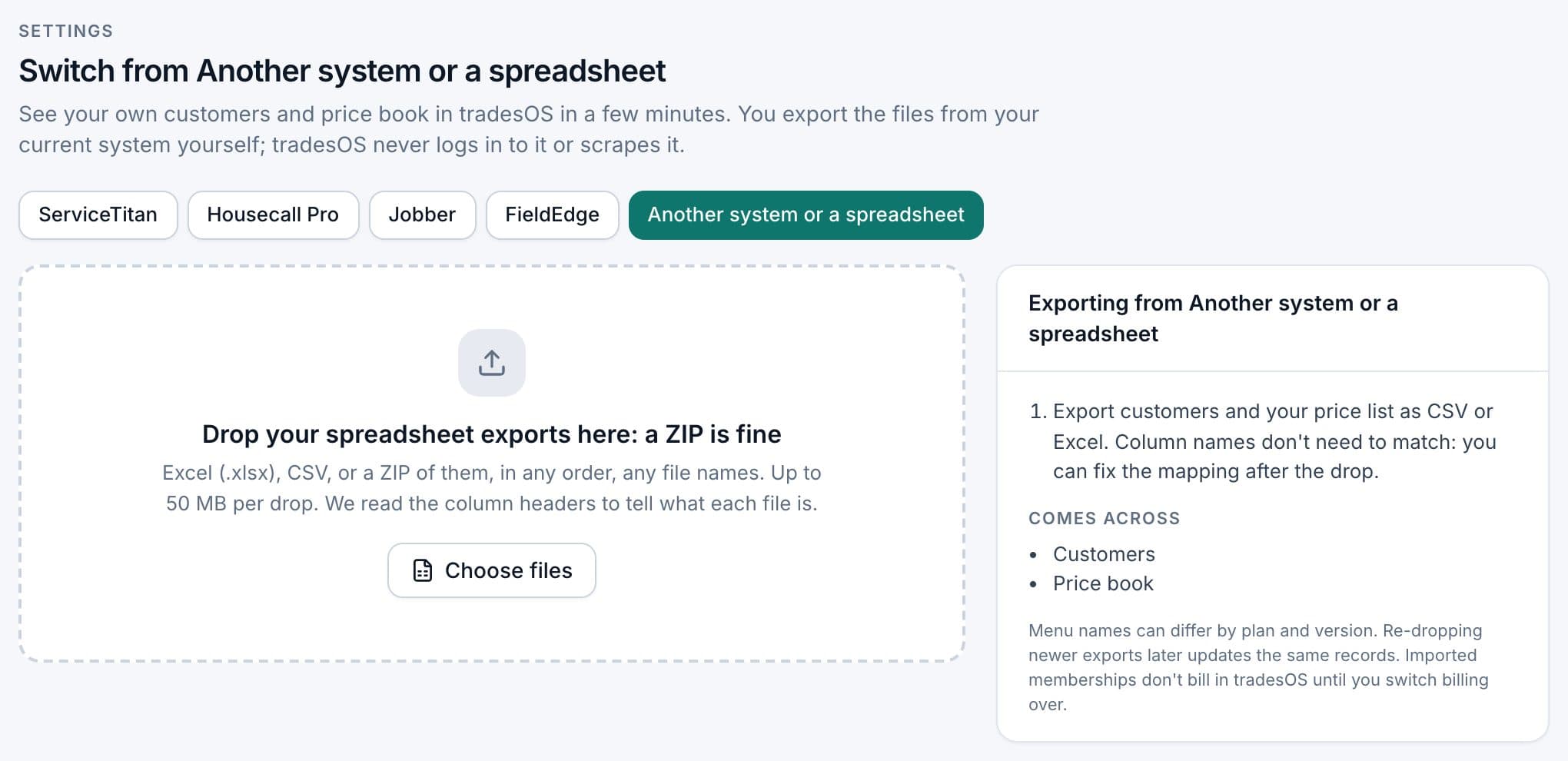
Open Settings › Integrations and go to the import page. You need the Owner or Admin role. ServiceM8 isn't one of the named sources, so you use Another system or a spreadsheet, which takes a customer list and a price list. Here's the whole flow on real screens.
1. Choose Another system or a spreadsheet
The source buttons sit across the top of the import page; press Another system or a spreadsheet. Drop CSV, Excel or a ZIP, up to 50 MB per drop. TradesWork never logs in to ServiceM8.
What makes the ServiceM8 files go in cleanly:
- Addresses. The Client List has a company address and a billing address.5 TradesWork may match the billing address to Street on its own, because "billing address" is one of the names it recognizes. If you work at the company address, change the match. Keep the other address in notes if it's different.
- Names. A full-name column or separate first and last name columns both work. A client with a company name and no person name comes in as a commercial customer.
- Multi-site clients. One row becomes one customer with one service location. Add other sites by hand.
- Prices. "$1,249.00" is fine. Text like "call for price" isn't an amount and lands on the leftovers list.
- Columns with no TradesWork field stay behind in your file. Map the one that matters to Notes.
What you set up by hand
The spreadsheet route brings customers and a price book, nothing else. List the rest honestly:
- Memberships. Use your recurring jobs as the list. Create the plan types you sell, enroll each customer with their next visit date, and set member pricing. Set the first TradesWork billing date after the customer's last ServiceM8 charge so nobody pays twice.
- Equipment. Add units for members and recent installs first. Techs add the rest on their next visit.
- Forms and checklists your techs fill in on site.
- Quote and invoice wording, reminders, on-my-way texts and follow-ups.
- Your team. Office staff are free seats in TradesWork, so add everyone.
The side-by-side run, and re-importing newer exports
Put one crew on TradesWork Field first, ideally including your Android users, so you see the difference early. When that crew's week looks normal, move the office, then everyone else. Keep invoicing and collecting old ServiceM8 jobs in ServiceM8, so receivables stay in one place until they're paid.
While both systems run, the office may still add clients in ServiceM8. Download a fresh Client List and drop it again. Customers are matched by an ID column if your file has one, or by name and address, so a re-drop updates what's there instead of duplicating it. Re-drops add and update; they never delete. If a client's name or address changed between exports, check for a duplicate.
ServiceM8 applies credit pro-rata when you change plans,2 so if your job volume there drops during the overlap, a smaller plan for the last month is an option.
Payments, phones and QuickBooks
Cards. Card details sit with the payment processor, not in any export. List the customers who pay automatically, then send each a link to save a card in TradesWork, starting with whoever is billed soonest. Keep charging them in ServiceM8 until they've saved one.
Phones. Numbers move by porting. In TradesWork go to Settings › Phones › Numbers, Routing and Texting and choose Bring your numbers. Ports take one to two weeks. Keep the old service until the port shows done.
Accounting. TradesWork connects to QuickBooks Online. Connect the same company ServiceM8 synced to and set a cut-over date: only invoices and payments created in TradesWork after that date post, and imported customers post nothing. Turn off ServiceM8's sync on the same day. If you're on Xero or MYOB, TradesWork doesn't connect to them today, which may be reason enough to stay.
Cancel last
ServiceM8's help center is clear: only the account owner can cancel, in the web interface on a Mac or PC, you can't cancel with an outstanding balance, and once you cancel all data is removed and isn't recoverable.1 So the last week runs in this order: re-run the Client List, Job List and receivables, create a fresh backup (it runs once per 24 hours4), open every file, pay any balance, then cancel at Settings › ServiceM8 Account › Cancel Account and log out to finish.1
What switching really costs
| Cost | Example | Your number |
|---|---|---|
| ServiceM8 today | Premium, $149 a month for 500 jobs, unlimited users2 | |
| TradesWork | Pro: 5 × $99 = $495 a month billed annually, or 5 × $114 = $570 month-to-month; office seats free | |
| Overlap | One more month of ServiceM8, possibly a smaller plan2 | |
| Office time | 6 to 12 hours: exports, column review, memberships (example) | |
| Tech training | 2 hours per tech (example) | |
| Card re-collection | Calls and texts over two to four weeks | |
| Phone porting | Carrier fees, if any |
In this example TradesWork costs about $346 a month more. It's worth it only if memberships, replacement sales or office time recovered are worth more than that. If you can't name where that money comes from, stay on ServiceM8.
ServiceM8 to TradesWork checklist
- 12-month cost compared honestly
- Client List, Job List, materials, accounting exports and backup saved
- Phone port requested in week one
- Sandbox import checked; Street matched to the work address
- Customers and price book imported into your real company
- Memberships set up from your recurring jobs
- Pilot crew ran a normal week on TradesWork Field
- Fresh Client List re-dropped during the run
- Card links sent; QuickBooks cut-over set and ServiceM8 sync off
- Final exports and fresh backup opened, balance paid, then cancelled
Next steps
Read TradesWork vs ServiceM8 for the side-by-side, including where ServiceM8 is the better buy. If you're weighing bigger platforms too, our ServiceTitan migration plan shows how a dedicated importer brings history across.
Footnotes
-
ServiceM8 help center, "How to cancel my account." https://support.servicem8.com/help-center/tips-trick-more/more/how-to-cancel-my-account ↩ ↩2 ↩3
-
ServiceM8, Pricing and FAQs, checked October 15, 2026. https://www.servicem8.com/pricing ↩ ↩2 ↩3 ↩4 ↩5
-
ServiceM8 help center, "What is the Advanced Reporting Pack Add-on." https://support.servicem8.com/help-center/servicem8-add-ons/reports/what-is-the-advanced-reporting-pack-add-on ↩ ↩2 ↩3
-
ServiceM8 help center, "How to download a backup of your ServiceM8 data." https://support.servicem8.com/help-center/tips-trick-more/more/how-to-download-a-backup-of-your-servicem8-data ↩ ↩2
-
ServiceM8 help center, "How to view personal information relating to a particular client." https://support.servicem8.com/help-center/desktop/more-on-the-online-dashboard/how-to-view-personal-information-relating-to-a-particular-client ↩
